


How to Import your Data in R
- Joseph S.
- Jan 2, 2022
- 1 min read

Updated: Jan 6, 2022
When it comes to data preprocessing in R, you'll realize how important it is because this process is the foundation for implementing various machine learning algorithms. Unlike Python, data preprocessing in R is shorter and provides a quick summary of the regression model. One of the first steps in data preprocessing is importing the dataset which this tutorial will show you.

Importing Data
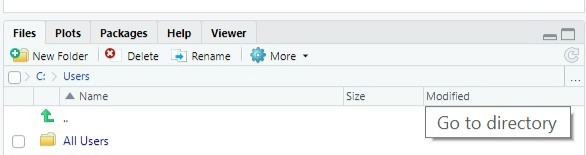
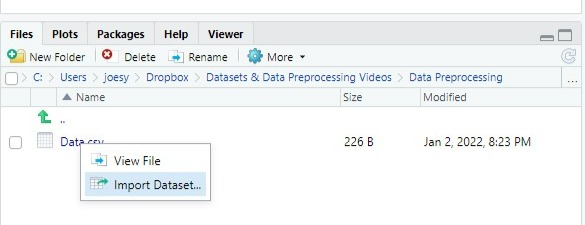
We're going to use "Data" as our dataset. You can find this dataset in Learning Tools under Data Preprocessing. To start importing this dataset open R studio and look for the three ellipses it should direct you to your directory. When you click on it, it will open up your file folder on your desktop. Find the folder the dataset is saved under and open it. On the bottom right in R studio under the Files tab, you'll be able to see what you've stored within that folder. Next click on the file and import the dataset. Lastly, you want to set your folder as a working directory. To do so, look for a blue widget icon and click on it. Then scroll down until you see Set As Working Directory.
Steps to import dataset
When importing your data, you should:
Go to Directory and open the folder that contains the dataset
Import Dataset in R studio
Set the folder in R studio as a working directory so that R can locate your folder.



There you have it; you successfully imported your dataset in R studio!
Comments